When I consider changing a work tool, I think about old files before the price list. Documents and images accumulated over time, familiar shortcuts and the formats colleagues exchange all need to survive the move. The existence of a cheaper app does not by itself make a workflow easy to transfer.
ArtCraft’s Crafting Apps challenge that cost of moving. The applications available in October 2026 aim to provide familiar Adobe-style image and video workflows and Microsoft Office-style document, spreadsheet and presentation work. What interests me extends beyond similar-looking screens: these tools expose code people can change and ways for both humans and AI agents to operate them.
Keeping familiarity while widening choice
The official Crafting Apps hub presents free, open-source Rust applications. It labels PhotoCraft early alpha and the five other apps considered here—VectorCraft, FilmCraft, WordCraft, GridCraft and DeckCraft—in development. An available installer and readiness to take over an entire workflow are different milestones.
There is a practical reason to preserve familiar menus and working sequences. Learned concepts and editing habits are assets too. Accepting those assets could reduce the burden of switching. But I would judge the result by whether someone can keep editing a file after it reaches another person, more than by resemblance between screens.
The official links below provide a starting point for examining the claims and finding installations. This is not a hands-on comparison of every application in professional use. It is a contribution examining the implications of tool choice through the implementation scope and development status published by each project.
From pictures and video to documents and calculations
PhotoCraft documents layers, masks, adjustments and PSD editing. VectorCraft describes pen tools, shape operations and SVG/PDF exchange; FilmCraft describes timeline editing, color work and audio. These invite comparison with Photoshop, Illustrator and Premiere workflows without guaranteeing identical features or results across the original products.
The Office-style applications extend the idea. WordCraft lists styles, tables, tracked changes and DOCX exchange. GridCraft describes formulas, charts, pivots and XLSX work. DeckCraft covers slides, themes, transitions, presenting and PPTX exchange. The types of files someone actually works with offer a sensible guide to which app to explore first.
The expansion matters because creative and office work are connected in practice. An edited photo enters a report; calculations become presentation material. As files pass through tools, the important question is how much editable information survives, rather than how many features each tool lists. Open file-handling code and automation paths can contribute here.
Community enthusiasm meets the work of maintaining a product
In early October on Hacker News, developer echelon said he was using Opus 5.5 to build Adobe-style Rust applications. In another post, he acknowledged their very early state and the need for time and help. Those statements describe an AI-assisted direction, not a measured autonomous share of the code or proof of complete product equivalence.
The discussion combined enthusiasm for open alternatives with concern about testing and maintenance. Both deserve attention. Rapid implementation expands the range of products people can attempt; keeping users able to open their files next month remains an ongoing obligation.
Longstanding open-source projects and their communities are part of this background too. Explaining the speed of a new project does not require dismissing accumulated work. I believe ArtCraft will become more persuasive by openly fixing failures in real tasks and keeping those fixes working, alongside showing familiar interfaces.
What changes when an agent can operate the tool
WordCraft and DeckCraft document actions exposed as commands through CLI and MCP interfaces. GridCraft also exposes a command channel. Alongside estimating button positions on a screen, an AI agent gets an explicit route for specifying an operation on a document.
The workflow I would like extends beyond requesting a finished report: revise source data, recalculate, update slides and let a person review the changes. For such connections to be dependable, the system must expose results, reversals and document-state checks. This is a possible direction suggested by the architecture, not an integrated cross-app capability verified in this essay.
REA and ArtCraft have different roles. REA investigates existing programs; ArtCraft is a collection of new editing applications. The sources examined did not establish that ArtCraft was built using REA. They belong in the same discussion because both raise questions about the expanding range of software that agents can inspect, implement and operate.
Follow one file through the whole journey
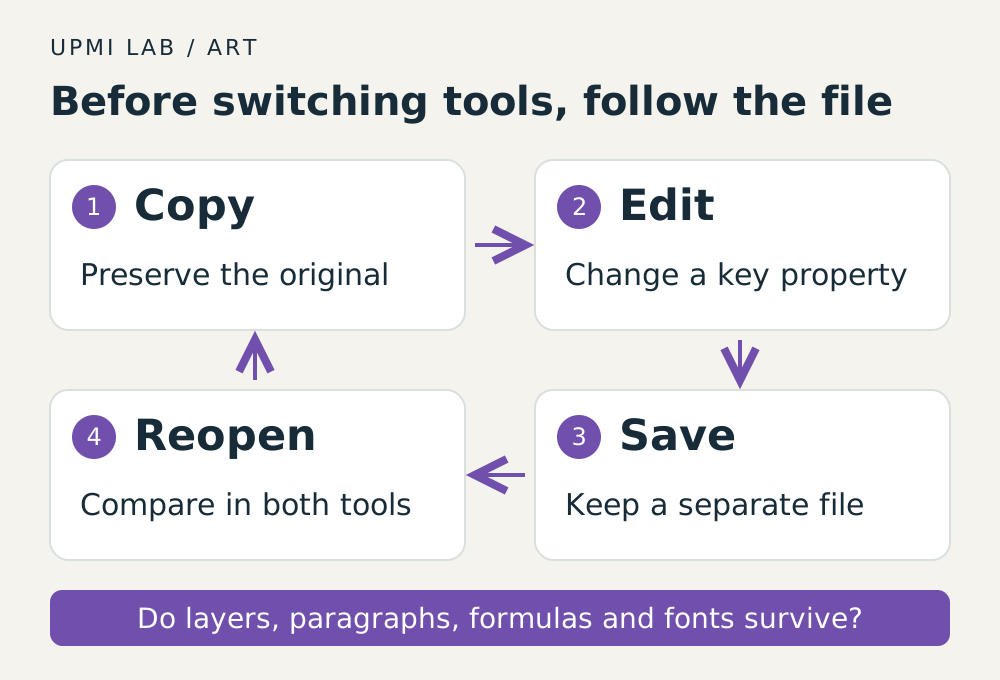
I recommend starting at the official app page, reading its development status and platform options, then using a copy of one real work file. Open it, make a small edit, save under a new name and reopen it. For collaborative work, compare the result in the recipient’s original tool as well. This is an editorial proposal, not a benchmark performed for this article.
Choose the properties that matter: layers and masks in images, line breaks and revision history in documents, formula results and dates in spreadsheets, fonts and placement in slides. A similar appearance can conceal lost editing information. Report a problem with the app version, reproduction steps and a small example that is appropriate to share.
If a small file passes, expand to more complex work. Accumulated checks turn an abstract claim of replacement into a practical judgment that a specific task can continue. The user becomes both a consumer of an open project and a contributor who can explain its quality through evidence.
The next competition is continuity of work
ArtCraft’s arrival does not yet establish the defeat of existing software businesses. Professional value also comes from accurate handling of complex files, collaboration, support and continuity with years of work. As AI makes feature implementation faster, evidence of these qualities may become more important.
I will watch how far developers open the commands and file pathways inside their tools. If users can take work elsewhere and attach their own automation, products must keep earning their choice. Reliable editing and connections then become central competitive strengths.
The next owner of a familiar tool need not be a single new brand. It could be a user able to describe a task, compare results and demand useful changes. ArtCraft is worth exploring because it offers concrete files with which to test that wider choice, rather than because it can already be declared a finished replacement.
Official app pages, repositories and public developer posts were checked on October 24, 2026. Feature descriptions reflect published project scope, not an independent professional-use test. ArtCraft’s use of REA was not established. Forecasts and the file-comparison method are editorial interpretation and proposals.
- ArtCraft · Crafting Apps ↗
- PhotoCraft · project documentation ↗
- VectorCraft · official app page ↗
- FilmCraft · official app page ↗
- WordCraft · project documentation ↗
- GridCraft · project documentation ↗
- DeckCraft · project documentation ↗
- echelon · development account, 2026-10-02 ↗
- echelon · project status and discussion, 2026-10-05 ↗