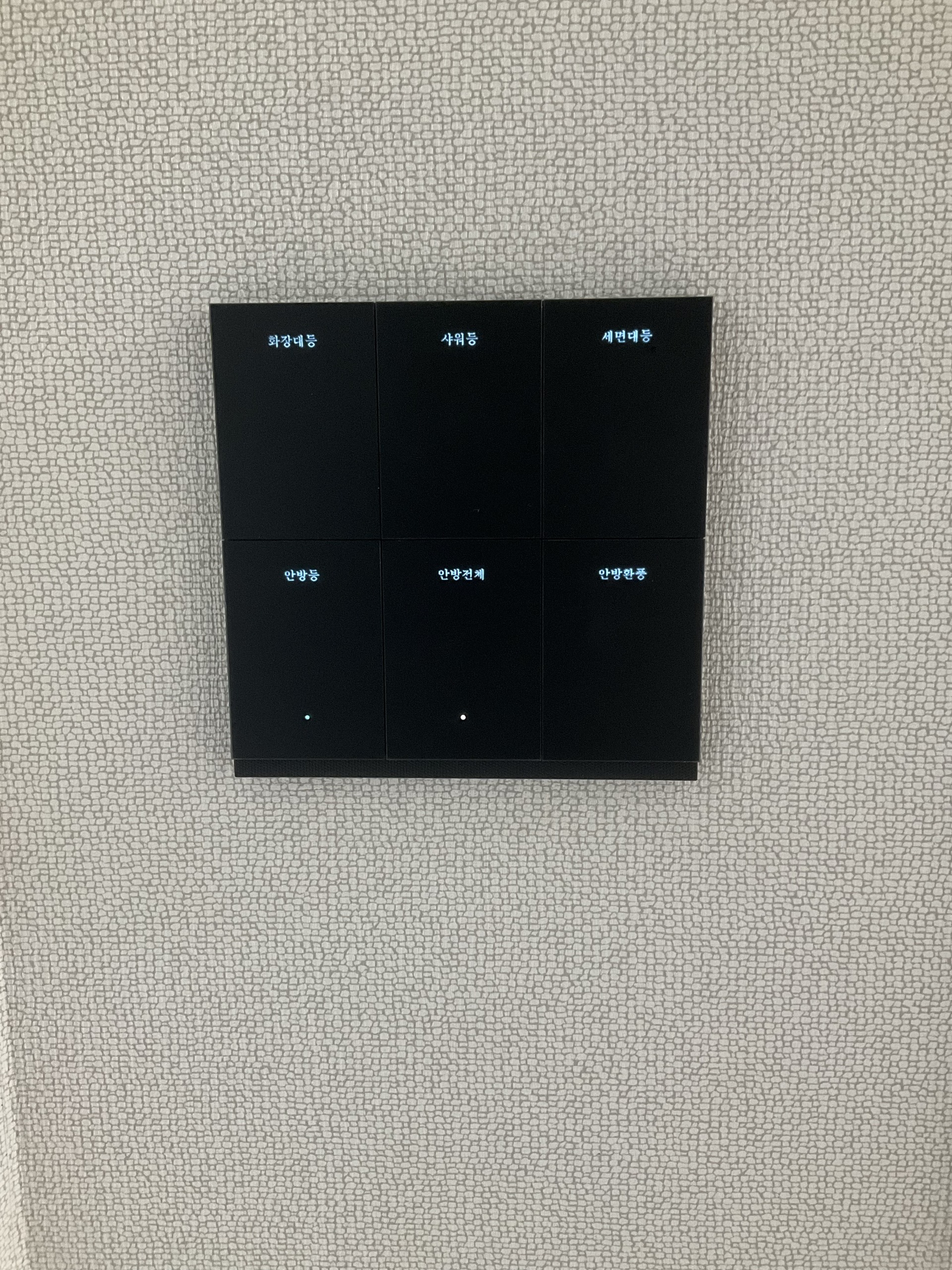
You turn off the bathroom light but want the fan to run a little longer. That means remembering to return and stop it. At the end of a corridor, the switch is inconveniently at the other end. Phone control can help, but if the app and wall button show different states, the user has to decide which one to trust. Repeatedly getting an unexpected response can lead people to abandon the very feature intended to make life easier.
UPMI Lab’s smart-switch project addresses both everyday effort and this confusion. Its operator replaced a four-button mechanical switch with a six-button smart switch and worked with an AI agent to define household rules for each button. Beyond deciding what should run together and when it should stop, the operator aligned the app and physical buttons with the actual device states. What mattered more than the button count was whether people could predict the response and trust the result.
Beyond moving a switch onto a phone
Remote on/off control is useful. Yet if the app says a light is off while the wall indicator remains on, or pressing “all off” turns another light on, users must check every action. More ways to control the home can then mean more work verifying it. The problem is not only missing features; it is different controls reporting different versions of the same home’s state.
Product apps already offer scheduling and automation that solve some needs. Combining existing wall-panel lighting with other switches, however, can require additional integration and rules. This project built on an earlier Homebridge connection to Apple Home. Rather than replacing every device, the operator used software to redefine the wall buttons' roles.
That resembles the idea of programmable controls in an intelligent building: one button can coordinate equipment and a sequence of actions instead of controlling only its directly wired light. This is not an entire building-management system transplanted into a home, but it illustrates scope for household users to design their own controls.
Making one press of ‘all off’ behave as expected
A button that switches off a room seems straightforward. Yet when individual buttons and an app control the same lights, the grouped button's remembered state can diverge from reality. Users then have to decide whether to press again or risk turning something else on.
The operator configured the grouped button to derive its state from its member devices. If any member is on, one press turns them all off; if all are off, it turns them on. ‘All’ means a predefined room group. The living-area group includes kitchen, dining, living-room and corridor lights; the bedroom group includes lights and ventilation.
The blue wall indicator follows the same combined state. Switching on an individual light activates the grouped-off indication; switching off all members clears it. Actions in the app also update the wall button. People should be able to anticipate what a press will do without understanding the integration. That consistency helps a feature become an everyday tool rather than a brief demonstration.
Lights off, ventilation longer—and manual control first
The bathroom rule starts the fan with the washbasin light and is configured to keep ventilation running for 15 minutes after the light goes off. Turning the light back on cancels the pending shutdown, and the next switch-off restarts the interval. Switching the fan off manually cancels the timer too, giving the user's action priority.
Different switch-off actions can express different intentions. Turning off the individual washbasin light leaves ventilation running, while the bedroom's grouped button is treated as an explicit request to stop every member, including the fan. Useful automation has to account for these everyday exceptions.
The 15-minute interval is a chosen setting, not a value calculated by a humidity sensor. The Lab's records describe accelerated tests of the delayed-shutdown logic; a full 15-minute field check and long-term stability remain areas for further verification. Configured behavior and thoroughly tested behavior are distinct.
Extending a button's role rather than adding a control wire
In the corridor, a button on the six-button panel at the entrance was linked to the existing single-button switch at the far end. Both control the same light, and its actual state is returned to the other indicator. No new dedicated control wire was run between the two positions; the switches still require their power and load wiring.
According to the operator, the replacement and original products had the same face area and installation depth, allowing installation without enlarging the wall opening or back box. The bedroom's two added buttons were assigned to wall-panel-controlled bedroom lighting and a grouped room function. These conditions apply to this installation, not every four- and six-button product.
More functions did not have to mean memorizing button positions. Korean labels identify the washbasin light, bedroom group and bedroom ventilation, among other functions. The aim was to let a person read a name and press a wall button without taking out a phone or understanding the setup.
A home with user-defined rules, rather than an AI deciding every press
The operator gave the agent everyday requirements rather than a finished engineering specification: the group indicator should turn on when any member is on, and a switch-off at the other end of the corridor should update this panel too. The agent helped modify grouping and delay logic in the Homebridge plugin running on the NAS. The operator tested wall buttons and the app and described discrepancies for further revision.
The finished switch does not ask AI to decide each action. AI helped build the configuration; defined rules perform the daily operation. Nor does this mean the system independently learns household habits. Some logic runs on the NAS, but a Tuya external-service path remains part of the integration, so the entire setup is not independent of internet connectivity.
The result is neither a universal finished product nor measured energy savings. It is a wider ability for a user to describe, test and revise how an actual home behaves. Convenience can be defined by everyday life rather than only a manufacturer's feature list. The next question for smart homes is not simply how many devices connect, but who can decide what those connections do.
Analysis based on UPMI Lab's smart-switch account, installation photograph and published behavior and verification records. The discussion of the user's changing role is editorial interpretation. UPMI Lab and New Epoch Journal are both operated by UPMI Co., Ltd.
- UPMI Lab · Beyond app-based on/off control (Korean) ↗
- UPMI Lab · Integrating existing wall panels and devices into Apple Home ↗