WhatsApp’s new optional parental controls for 13–17-year-olds are set up together on a teen’s phone and a parent’s phone. If the Parental controls option appears in the teen’s WhatsApp settings, the teen starts there, the parent scans a QR code and creates a six-digit PIN, and the teen finishes the privacy review. WhatsApp says the feature is rolling out gradually and may not yet be available in a given region, so its presence for every account in India cannot be assumed.
Announced on September 30, 2026, the controls let a parent manage selected privacy and feature settings without reading the teen’s private chats or listening to calls. That difference matters: this is a joint account-setting tool, not a message-monitoring feed.
Setup at a glance
| Where | Action | Condition |
|---|---|---|
| Teen phone | Settings > Parental controls; confirm age | Teen aged 13–17 |
| Parent phone | Scan QR; verify adult; set 6-digit PIN | Parent or guardian 18+ |
| Teen phone | Enter PIN; review settings; finish | Both sides agree; latest WhatsApp |
The feature is rolling out gradually and might not yet be available for every account in India. Chats and calls remain private.
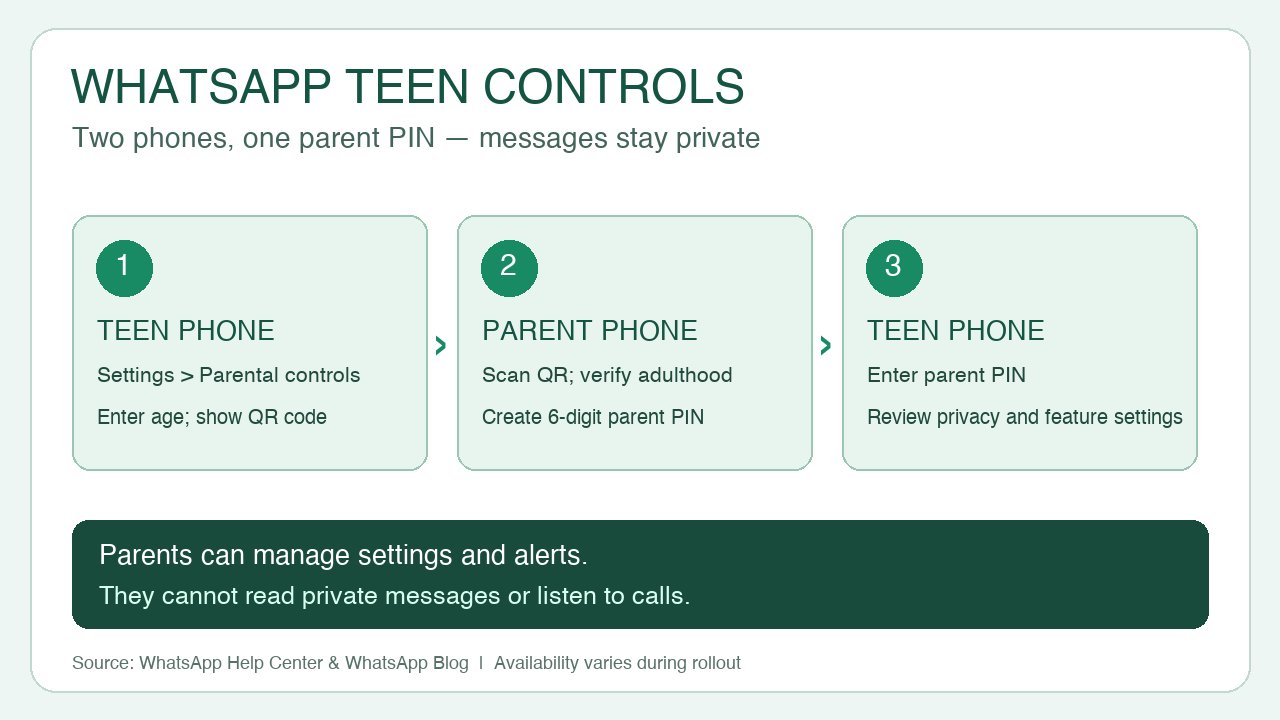
Set up the two phones
First update WhatsApp on both iPhone or Android devices. The teen must be 13–17, the parent or guardian at least 18, and both must agree to link their accounts. On the teen’s phone, open Settings > Parental controls > Continue, enter and confirm the teen’s date of birth, then continue to the parent-linking screen.
On the parent’s phone, scan the QR code shown on the teen’s phone. Follow the link into WhatsApp, continue through adult verification, then create and confirm a six-digit parent PIN. WhatsApp says this PIN is needed to access and change the teen’s privacy settings and should not be shared with the teen.
Return to the teen’s phone, enter the parent PIN, review or change the privacy and feature settings, and tap Continue > Done. The teen then acknowledges the new account experience. If the Parental controls menu is missing after updating, WhatsApp’s rollout warning means the option may not have reached that account or region; the company does not give a universal India switch-on date in its setup guidance.
What a parent can change—and what stays private
WhatsApp says parents can choose who sees the teen’s profile photo and who can add them to groups. A teen needs approval through the parent-set PIN to loosen those settings. Parents can receive alerts when the teen joins or leaves a group or when a group grows meaningfully. They can also choose how Channels and Status work for the teen, and select between the default 13+ Meta AI experience and a stricter Limited Content option.
Those controls do not give parents a copy of conversations. WhatsApp says personal messages and calls remain protected by end-to-end encryption, even while parental controls are on. The announcement describes settings and alerts, not access to message content. It also does not promise that all AI features can be disabled.
Choose the right account type before starting
WhatsApp distinguishes these optional teen controls from its parent-managed accounts for younger children. A parent looking for the younger-child account should use that separate route rather than treating the 13–17 setup as interchangeable. The teen controls can later be adjusted or turned off by the parent, according to WhatsApp.
For an Indian family, the practical first check is simple: update both apps and look for Settings > Parental controls on the teen’s phone. If it is present, review together which contacts, groups, Channels, Status and AI settings fit the teen. If it is absent, wait for the gradual rollout rather than relying on an unverified workaround or an assumed national launch date.
WhatsApp’s September 30 announcement and its Help Center. India-wide availability is not confirmed by these sources.
- WhatsApp Help Center: setup ↗
- WhatsApp announcement, September 30, 2026 ↗
- WhatsApp Help Center: account types ↗