Free Gemini users can access Gemini 4 Hydrogen through automatic model selection when Google judges it appropriate for a prompt; they cannot simply lock every chat to Hydrogen. Google announced its global rollout on November 12, 2026, and its current personal-account help table lists Hydrogen for manual chat selection on Google AI Plus, Pro and Ultra. The distinction matters when deciding whether the free app already covers a task or a paid plan provides the control needed.
Hydrogen joins the Gemini 4 family as Google’s model for everyday work and rapid execution, including coding and multistep workflows. Google positions Carbon and Argon for deeper reasoning tasks while bringing Hydrogen across consumer, developer and business products. A shared model name does not make access identical across those products: the launch announcement and its free-access footnote need to be read alongside the app’s plan table.
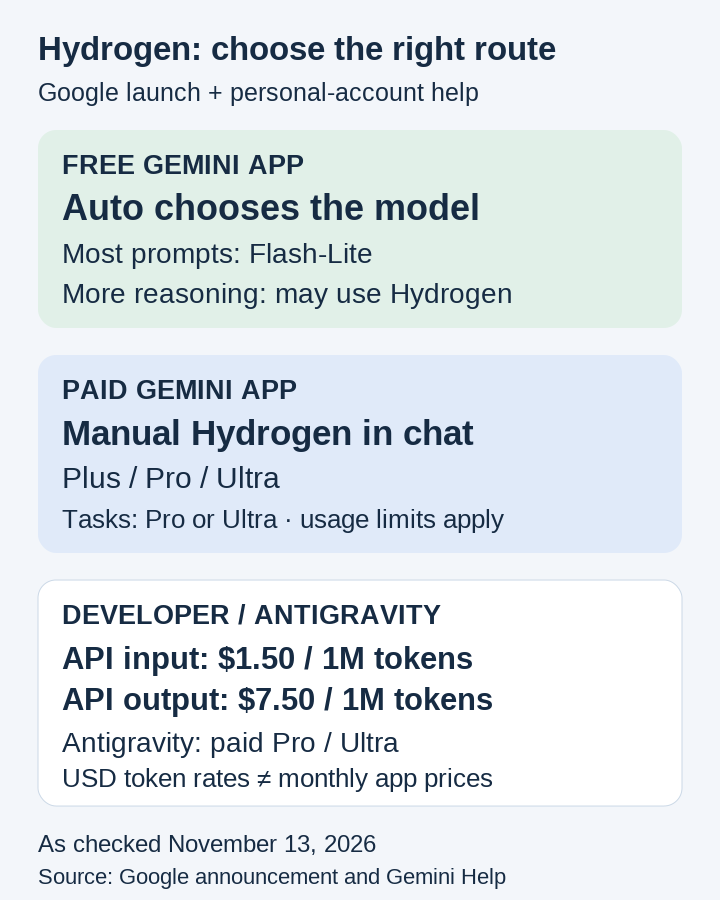
What free Auto actually gives you
For a personal account without a Google AI plan, the available chat choices are Auto or Flash-Lite. With automatic selection on, most prompts use Flash-Lite, while prompts requiring more reasoning may use Hydrogen. With automatic selection off, the help page says all responses use Flash-Lite. Free access therefore means that Hydrogen can be selected by the service, not that every answer comes from it or that a free user gets a permanent Hydrogen selector.
Google AI Plus, Pro and Ultra each list Hydrogen among their chat models. Paying users can select a model from the current-model control at the bottom of the chat box; locked models require an eligible upgrade. The help table treats Tasks separately: Pro lists Hydrogen and Argon for Tasks, while Ultra also lists Carbon. Plus has no Tasks entry. A chat entitlement should therefore not be read as permission to use every model in every mode.
Paid app access, Tasks and API charges
Remaining usage also affects access. Google says that after a paid user reaches the relevant limit, the conversation continues with Flash-Lite. Its personal-app table offers Low, Medium and High thinking levels. The developer launch separately describes a fourth, xhigh level for Hydrogen; that API capability is not evidence that the same control appears in the consumer app. These distinctions explain why two access descriptions can differ without either describing an unlimited allowance.
The published API rate is $1.50 per million input tokens and $7.50 per million output tokens, flat across the model’s 1 million-token context window. Those are developer usage charges in US dollars, not monthly Gemini subscription prices in either the US or UK. Google also specifies paid AI Pro or Ultra access for Hydrogen in Antigravity. Free app routing does not establish a free API quota or Antigravity entitlement, and the announcement supplies no basis for converting the API rate into a UK consumer-plan price.
Check the model used for your response
On a computer, Google’s help page says users can inspect a response through More, then Show thinking steps, and scroll to the bottom to see the model used. To control automatic selection, open Settings, then Usage limits, and turn auto model selection on or off. For an eligible paid plan, the model control in the chat box provides manual selection. These steps describe the personal-account interface in Google’s current help page.
The support table applies to personal Google Accounts; work and school availability depends on Workspace licensing. Rollout, remaining usage and the product being used all remain relevant. For a free user, the useful starting point is Auto and the model information attached to a response. For someone who needs deliberate model selection or Tasks, the plan-and-mode table provides the better comparison than the broad claim that Hydrogen is available to everyone.
Official announcements and public listings checked November13,2026. Account-specific access and video playback were not tested.
- Google November12 Hydrogen announcement and free-access footnote ↗
- Google Gemini Apps Help: About Gemini models ↗
- Gemini web app ↗