There was one class, but running it meant moving between several screens. Lecture materials were prepared as files, quizzes ran on a separate server, and assignments and university attendance records were checked in different places. Even with digital tools available, the instructor still had to move and reconcile the information between them.
UPMI Academy is an instructor-developed teaching platform that connects these tasks within one website. Instructor Jeong Gi-uk worked with the GPT Astra agent to link a digital whiteboard, material reader, assignment evaluation, quiz grading and attendance integration. The case goes beyond learning a system’s menus: it implements the rules of his own classes.
Connecting the tools had become another teaching task
The build records describe a problem beyond missing individual features. When materials, enrolled students and submission results for the same course sit in different places, the instructor must manage the connections. Students also move between separate places to read, answer questions and submit work.
The new platform uses courses, accounts and enrollment permissions as shared reference points. The instructor controls access to materials and the release of evaluations; students see their own courses, submissions and published results. Designing permissions and records together mattered more than collecting service links on a page.
Access itself became part of the classroom workflow. Students can install the website on a device’s home screen and, on supported devices with notifications enabled, receive material updates and assignment deadline reminders. This connects finding course information with receiving it when it is needed.

Without waiting for a new classroom display
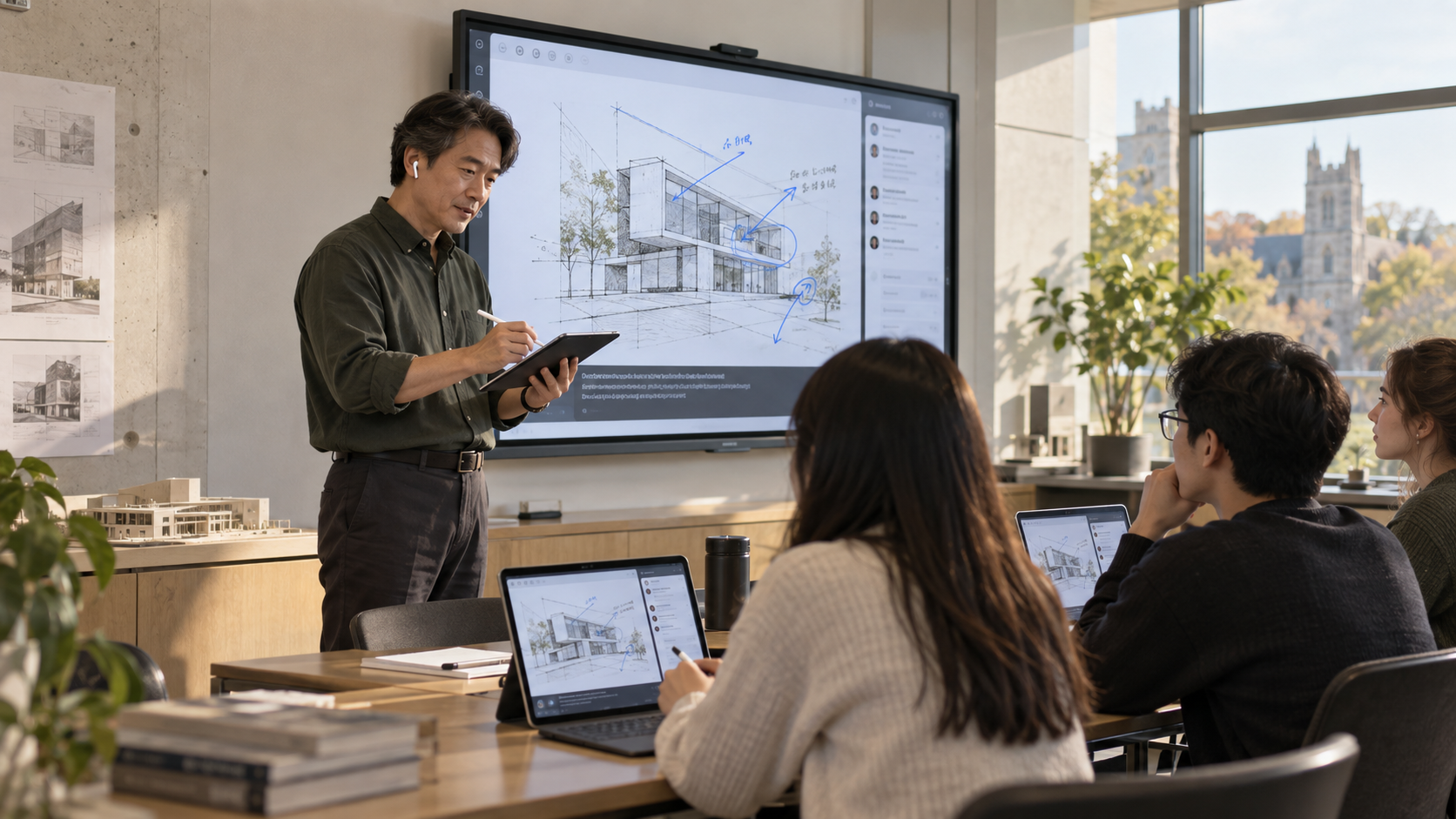
What the instructor needed from a digital whiteboard was the ability to write on materials, highlight important points and share the same view with students. He chose to connect a web whiteboard to an existing display or projector.
The setup can use an iPad and Apple Pencil for annotation and a browser-recognized microphone, including AirPods, for speaking. Changing slides or drawing an underline is reflected on students’ laptops and tablets. Pens, highlighters, an eraser, undo and annotation saved per slide were also implemented around classroom needs.
The claim of zero additional whiteboard purchase cost means that existing equipment was reused without buying a dedicated new display. It does not eliminate the costs of servers, devices, AI processing or maintenance. The change is that the instructor could build and revise needed functions independently of a hardware procurement schedule.
A route back to an explanation missed during class
Sharing a screen does not make every student understand at the same pace. International students need time to interpret speech, while students encountering an unfamiliar concept need a way to ask about it. The platform connects the instructor’s speech to captions and translation into a language selected by the student.
The AI assistant accepts questions associated with the current slide and is configured to answer with sources from instructor-selected course materials and reference books. It is meant to acknowledge when those materials provide no basis for an answer. The design aims to let a student check a short explanation and return to the ongoing class.
After class, caption records can be used to produce slide-by-slide summaries and study notes. The current workflow lets the instructor compare them with the original text, edit, review and export them; it is not presented as automatic distribution to students. The convenience of a summary remains paired with responsibility for reviewing it.
Separating automatic grading from instructor judgment
For assignments, the instructor can review uploaded work alongside evaluation criteria and enter scores and feedback. Evaluations can be saved as drafts, with students seeing their own results after publication. Immediate evaluation means the instructor can review the work directly, not that AI automatically grades assignments.
Quizzes that can be graded by answer rules were automated. Questions, grading methods and result records from the separate quiz server were migrated into the platform. Students take quizzes within their courses and view their own released results, while practice attempts remain separate from formal tests.
Formal quiz submissions feed into weekly attendance checks under instructor-defined rules, with results checked again after being reflected in the university portal. Late arrivals, excused absences and manually confirmed records are protected. Differences between quiz weeks and the university attendance calendar after a canceled class are also accommodated. Handling these exceptions is a concrete form of personalization.
Material distribution was designed around enrollment access
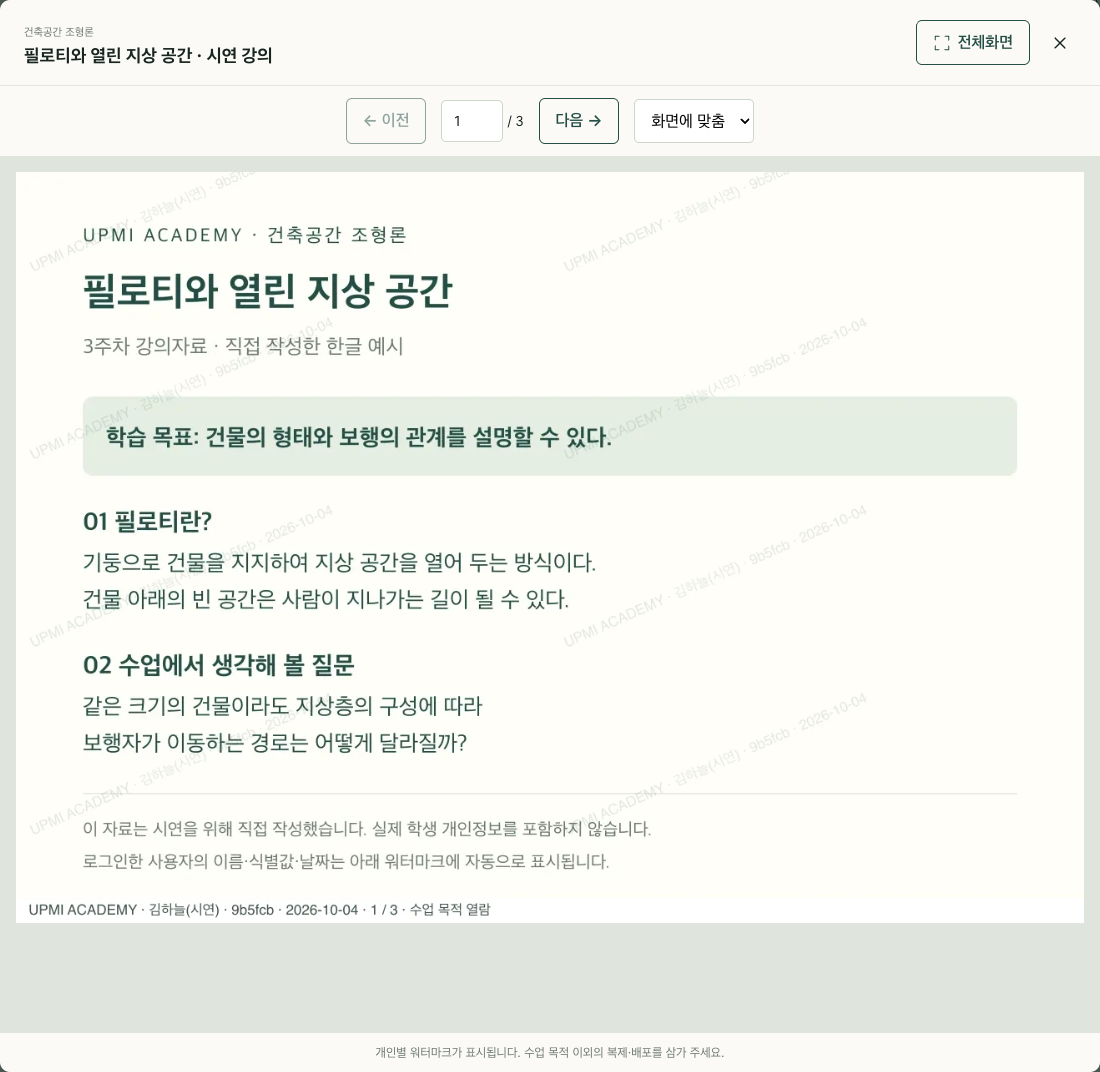
Lecture materials are offered in an ebook-style reader within the website. Students open materials permitted by their enrollment and revisit individual slides, reducing the need to download files and locate them in another application.
The student view carries a watermark with the reader’s name, identifier and date. Access to original files, copying and printing are restricted as well. These measures discourage redistribution and help trace its source; they cannot completely prevent operating-system screenshots or photographs of the screen.
The published example is an actual app screen signed in as the fictional demonstration user Kim Ha-neul. The name and identifier are supplied from the signed-in account rather than prewritten into the teaching material. The instructor view is separate and does not use the student watermark.
The starting point was a teaching practice, not a finished specification
The build did not begin by submitting a complete blueprint. Existing materials and the quiz system were examined, the instructor’s and students’ tasks were identified, and GPT Astra helped translate them into screens, permissions, data connections and operating rules. Test accounts were used repeatedly for annotation and submissions, including checking that another student’s evaluation was not visible.
When short voice commands were not handled properly, their processing order was revised. Line breaks in translated captions and the timing of evaluation releases were also adjusted. This broadened the instructor’s options from adapting a class to a commercial system to describing a problem and modifying the system around it.
GPT Astra helped build the platform. During use, local Whisper speech recognition, translation and question-answering models chosen for the task, and data-processing programs perform its functions. Distinguishing the development agent from the services running during class is necessary to understand the operating model and its costs.
Ownership means having the ability to change the rules
This case is not evidence of superiority over every commercial education system. There was no broad product comparison or quantitative assessment of learning outcomes. Pen input and microphones still need checking on the devices used for class, while server operation, material protection and error checks remain ongoing responsibilities.
The demonstrated change is that one instructor designed connections that had been inconvenient in his classes and turned them into an operating platform. Being able to revise small requirements, such as attendance weeks after a canceled class or the release of evaluations, is what convenience and personalization mean in this case.
Turning a university teaching system into a personal platform does not mean replacing every institutional system. It means expanding the ability of the person who knows the class to define and change its features and exceptions. Here, the AI agent’s capability appears in its role in turning the instructor’s chosen teaching practices into working tools.
This analysis of an in-house case is based on UPMI Academy implementation and verification records and instructor Jeong Gi-uk’s build account. It does not imply an interview or independent external reporting. Implemented features, the operator’s experience and editorial interpretation are distinguished; learning outcomes and superiority over commercial products have not been established. UPMI Lab and New Epoch Journal are both operated by UPMI Co., Ltd.
- UPMI Lab: the teaching platform build account (Korean) ↗
- UPMI Academy public homepage ↗
- Related analysis: Do students in the same class have equal opportunities to understand? ↗