Sky is rolling out a free Sky OS upgrade for its UK Sky Glass and Sky Stream customers, bringing a redesigned home screen, conversational Smart Voice and My Library for bookmarks and up to 1,000 hours of eligible cloud recordings. Its November 17, 2026 announcement describes the update as arriving now; an identified Sky employee says delivery will take place over the coming weeks.
The change addresses a practical part of streaming television: finding a programme again after browsing channels, apps and saved shows. Sky puts those routes in a top navigation bar and separates saved viewing choices from recording controls. These are announced features and the company’s design goals, rather than findings from an independent speed or usability test.
The announcement date is not every customer’s delivery date
In a November 10 community notice, last edited November 17, Sky community manager Kev says the software has started reaching customers and will continue over the next few weeks. A Glass or Stream screen that still looks unchanged is therefore consistent with the stated rollout. Neither that notice nor the November 17 announcement gives a single completion date for every household.
After the update arrives, Home, TV Guide, My Library, Sport, Search and Settings sit together at the top. Recents brings recently used viewing routes back into reach, while the refreshed guide adds ways to browse channels and days. For an existing subscriber, locating those familiar tasks is the immediate consequence of the redesign, before trying the new voice search.
Watchlist saves a choice; recording depends on the programme
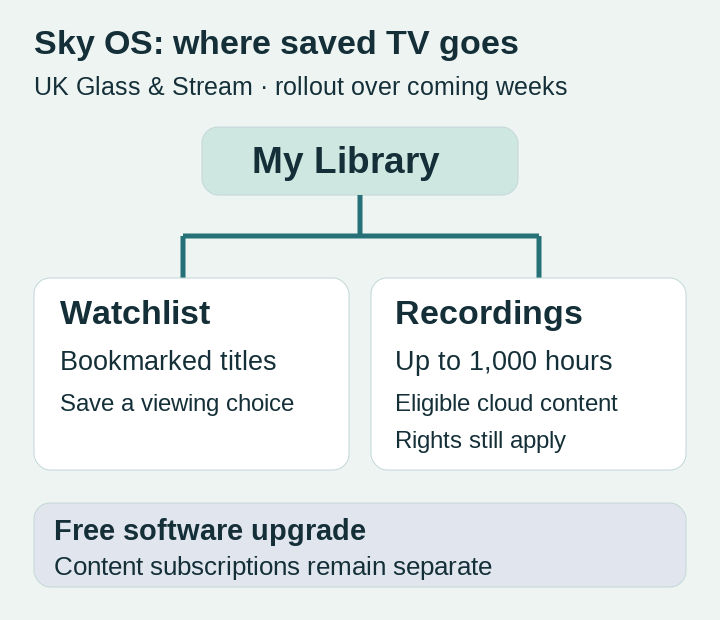
My Library contains Watchlist bookmarks and cloud recordings. Sky advertises capacity of up to 1,000 hours, with options to save, record and manage eligible programmes and sporting events. That eligibility qualification matters: saving a title to a list is not a promise that every channel or programme can be recorded or kept indefinitely.
To work with a programme, use the viewing controls to reach its recording options, then My Library to find and manage recordings. The practical check is whether a recording option is offered for the content concerned. This guide does not promise universal recording rights or a fixed retention period, and the free software update does not make separately subscribed television content free.
Using Smart Voice and taking saved viewing to Sky Go
For Smart Voice, press and hold the remote’s voice button and describe an actor, plot, setting or mood, then press it again for a follow-up request. Glass also supports a fresh “Hello Sky” for each hands-free request. On compatible phones and tablets, the separate Sky Go (Glass/Stream) app on Apple’s App Store or Google Play offers supported viewing in 1080p and eligible remote recording, included with a Sky TV subscription at no extra cost.
The useful change is a clearer route from a viewing choice to finding it later, alongside a search that does not require remembering the exact title. Start with My Library and the programme’s available controls, then use voice or the matching mobile app as needed. What a household can watch and record still depends on its content access and the supported programme; the rollout notice explains why neighbours may see the new screen at different times.
Dated primary records retain their territorial and eligibility limits. Creator and company accounts are attributed; analysis does not imply independent testing.
AI assisted with drafting and editing. This article is part of our preview edition. Editorial standards & corrections →